

 Aktualisieren
Designer Payments Hilfe
How do I register a Payoneer account and add it as a payout method on DesignCrowd?
Payoneer is an online money transfer platform, popular with freelancers and available in over 200 countries including India, Pakistan, Bangladesh, Philippines, Vietnam, Indonesia, Brazil, Australia, United States, UK, Canada and across Europe and Africa.
How does it work?
Customers on DesignCrowd can pay for their design project in 1 of 7 available currencies (GBP, AUD, USD, CAD, NZD, SGD, EUR). When DesignCrowd initiates payments to designers in different currencies, Payoneer converts the funds at a mid-market rate, taken from well-known financial institutes, with no fee.
Funds are then available in the payee’s Payoneer account in USD. This is a huge advantage to designers, as they can receive all payments to the same balance in one place, thus saving payees time and money.
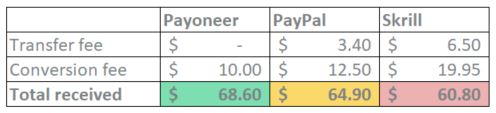
Here's a side-by-side comparison of the three payment methods offered on our platform for a payment $70.00 to your local bank account:
Transfer fees:
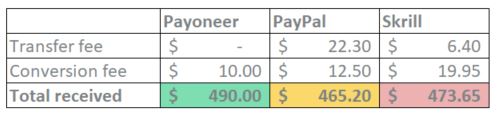
- Payoneer charges $0.00 transfer fee
- PayPal transfer fee is 30¢ + 4.4%
- Skrill transfer fee is €5.50 (c$6.50)
Currency conversion fees:
- Payoneer conversion fee is 2%
- PayPal conversion fee is 2.5%
- Skrill conversion fee is 3.99%
Here's a side-by-side comparison of the three payment methods offered on our platform for a payment $500.00 to your local bank account:
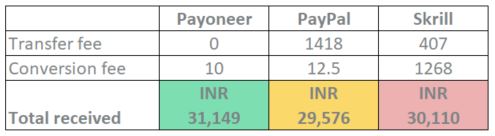
Breakdown comparison for a designer in India receiving $500.00 (USD) to local bank account:
How do I set up a verified Payoneer account?
Create a Payoneer account via this special url or copy and paste the url into your browser.
Follow the prompts to set and verify your Payoneer account. Please check your account is:
- Active and Able to receive funds
- Able to receive funds without limit
- Able to receive funds in all currencies
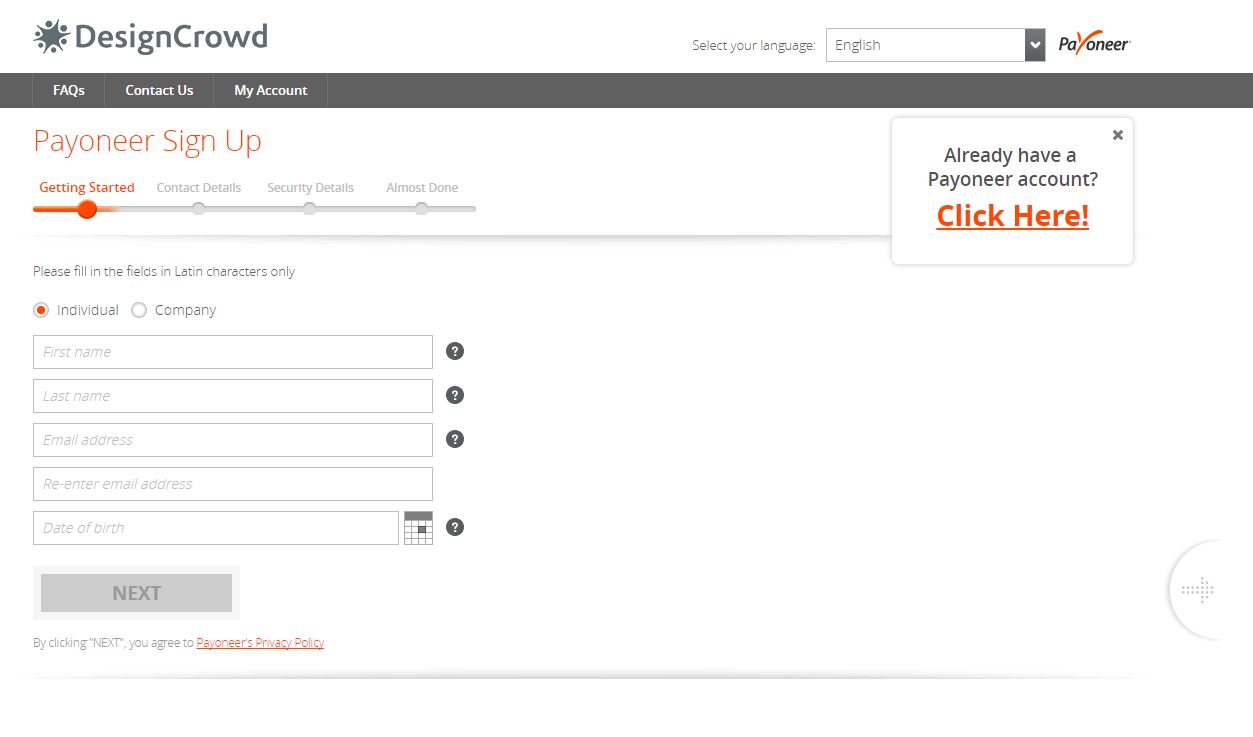
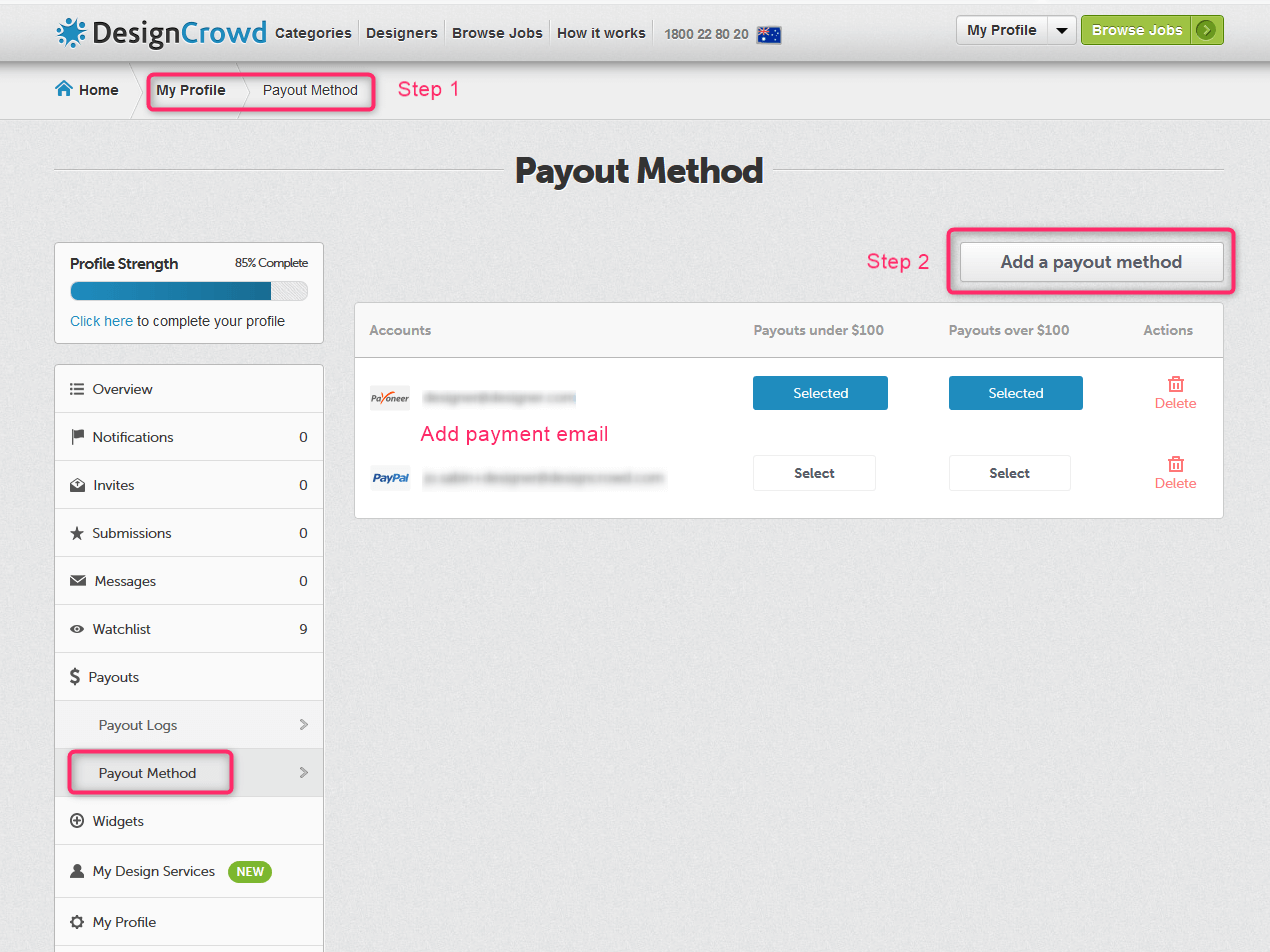
When you've completed the full set up of your Payoneer account and receive confirmation your account is approved (usually takes 1-2 hours), go to Payout Method in My Account and add Payoneer as your preferred pay out method.
Withdrawal options
Once the money has landed in the payee’s Payoneer account, they can use it in various ways:
- Withdraw to local bank account - here’s a video that explain how to withdraw funds to local bank account.
- Use the funds with Payoneer prepaid MasterCard® Card – payees can use Payoneer MasterCard® to make purchases online, in-store or withdraw money from an ATM.
- Transfer funds to another Payoneer account – free of charge.
Payoneer fees
- No load fees are charged to receive a payment.
- Conversion fee: if the payee chooses to withdraw funds to her local bank account, a conversion of 2% will apply. Note: Skrill are charging 3.99% and PayPal are charging 2.5%.
- For US payees – A transaction fee of $1.5 will be charged upon withdrawal to bank (no FX fee).
- MasterCard fees –the prepaid MasterCard fees are available here on the website.
Payment processing time – the payment from DC is available immediately on the Payoneer account/Prepaid MasterCard®. Withdrawal to bank can take between 1-5 business days, depend on the payee’s country and bank.
Payoneer/DesignCrowd promotions
Periodically we offer time limited sign up promotions with Payoneer. These offers apply to new Payoneer accounts and to existing Payoneer accounts previously un-linked to DesignCrowd. To be eligible for the bonus payments, add Payoneer to both payout preferences in your DesignCrowd account by the registration deadline specified in the promotion. Your Payoneer account must receive the minimum payment by the and of the promotion period as per the offer terms. Designer accounts that have previously received a DesignCrowd payment via Payoneer are not eligible for the rewards offered.