

 Aktualisieren
PSD web site UI
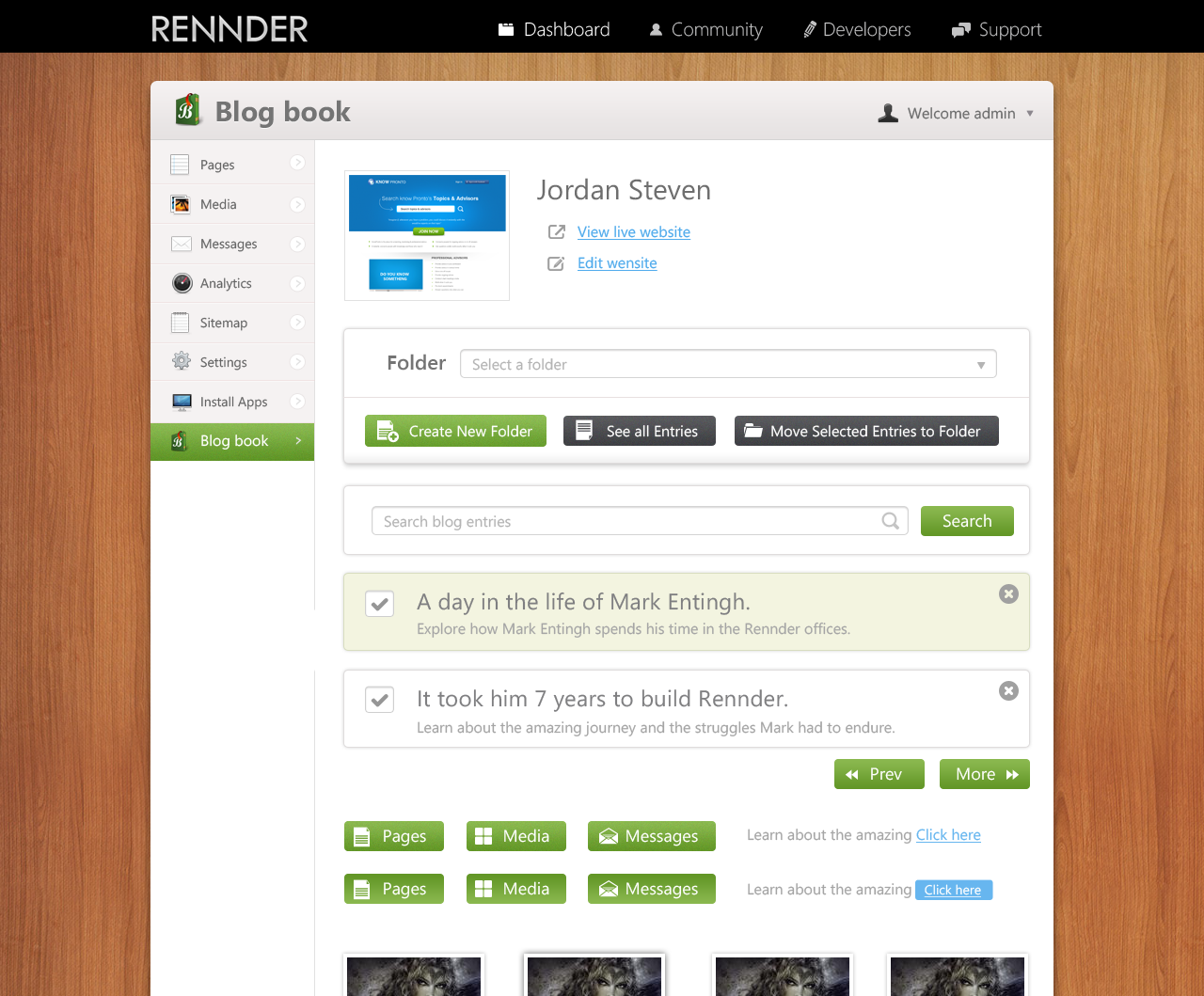
Wollen Sie auch einen Job wie diesen gewinnen?
Dieser Kunde bekam 13 Web-Designs von 3 Designern. Dabei wurde dieses Web-Design Design von krishnan als Gewinner ausgewählt.
Kostenlos anmelden Design Jobs finden
- Garantiert
-
 US$1240
-
 13 Designs
-
 3 Designer
Web-Design Kurzbeschreibung
I need a PSD of a web site interface that I can use to build a theme with, which will be used on www.rennder.com, an up-and-coming CMS platform that I developed.
Follow the specifications included within the RAR file download below, and use the included PSD as a reference to make your own unique UI design.
Winners will be chosen based on how clean & professional the design looks, by how many unique panel designs are included within the UI, and by how large of a target market could actually use the design for their business web site.
Contest winners will only need to provide their PSD as completed work.
Download the PSD mockup at the bottom of this page to get started right away!

Aktualisierungen
Project Deadline Extended
Reason: It was requested that I extend the deadline
Added Wednesday, February 27, 2013
Zielmarkt/( -märkte)
small businesses and freelance designers, photographers & artists.
Industrie/Einheitstyp
Business
Sehen und fühlen
Jeder Schieber zeichnet eine der Charakteristiken der Marke des Kunden aus sowie den Stil, den euer Logo widerspiegeln sollte.
Elegant
Fett
Spielerisch
Ernst
Traditionel
Modern
Sympatisch
Professionell
Feminin
Männlich
Bunt
Konservativ
Wirtschaftlich
Gehobenes
Anforderungen
Muss haben
- Your PSD can have any color scheme you want. It can be light, dark, green, blue, multi-colored, paper, metallic, glossy, shiny, solid, gradients, or any theme you can imagine. Be creative, but keep the design looking Web 2.0 & professional. The width of your design can be 960 pixels wide like in the provided mockup PSD, or it can be a 100% width design if you'd like.
-
Panels
-
Each theme requires a minimum of 5 panel designs, which is basically a box that can stretch to a specific width or that stretches to 100% width of the web site. These 5 panels include a header, body, footer, child (that is placed within the body panel), and an alternative body panel. Of course, you can create as many panels as you like to create a more custom theme. Your panels do not have to look like the ones provided in the PSD mockup. They don't have to be completely square with round corners. They could be a bubbly cloud, or wavy, or include garnish around the edges, or be torn paper, or anything you like. Also, you can include a title within some of your panels, which is basically a header design with text at the top of the panel.
Each panel must contain a set of elements that fit the design of the panel. The body of your design should also include this set of elements. These elements include at least one menu, a set of buttons, lorum ipsum text & an anchor link, and form elements, such as a textbox, dropdown, & checkbox.
-
body
-
The body of your design should use a texture, gradient, solid color, or a background image that stretches 100% width. If you separate the body of your design into sectioned rows, each row will be treated like a panel.
-
Dashboard section
-
After a user logs into their account on Rennder.com, they manage their web site via a dashboard. This dashboard has a complex design, but can be partially customized. All elements within the header of the dashboard can be rearranged. This includes the title, screenshot, section title, and section menu. The main menu on the left contains a list of sections within the dashboard, which when clicked, will load the section title & menu in the dashboard header, and load the section page within the body of the dashboard.
Dashboard Icons:
The main menu & other menus within the dashboard contain icons. You can create your own custom icon library to use with your theme if you'd like, and the toolkit comes with a complete set of icons to use if you choose not to create your own library.
Dashboard body:
Each row within the dashboard body (options, search, results, paging) can use a panel design, but the entire dashboard body can also use a panel design as well, so you could design your dashboard body to use just one encompassing panel instead of separate panels for each row if you wanted.
-
Buttons
-
Each panel must contain a set of buttons. Each button requires a regular design as well as a mouse-over design. These types of buttons include: default, apply, cancel, previous, next, and delete (delete should stay small like a "close window" button).
-
Menus
-
Each menu requires a mouse-over design & selected item design.
You can make many types of menus; vertical, horizontal, small, and large.
Each item in the menu can be uniquely designed to create a sequence of menu items. For example, grey, white, grey, white, etc..
-
Photo Gallery
-
each photo container can be uniquely designed, creating a sequence of designs in a list.
-
Comments
-
each comment post can be uniquely designed, creating a sequence of designs in a list.
This will be used for comments as well as twitter feeds.
-
Blog Entries
-
Create designs for a blog summary list & a blog entry details.
Each blog entry (summary or details) can be uniquely designed, creating a sequence of designs in a list.
You could display a title, date created, tag words, summary, and the entry text, but you don't have to display all fields.
-
Product List
-
Products can be displayed many different ways:
product details, list grid, list rows, or even featured products list (with a flashy design).
You can display the product title, price, sale price & sale end date, description, photo & photo gallery, add to cart button, and view product details button. You don't have to display all fields for each design. You could show just a photo & title with summary & no price, or just a photo & title, or just the photo if you wanted.
-
Form elements
-
The textbox can look completely custom, have rounded corners, a textured background, or look plain if you want. The other form elements on the other hand can only be manipulated by CSS, so are very limited in design. Only border color, background color, and text color can be changed. The drop down box can have a custom drop down arrow though.
-
Header Panel
-
Requires a horizontal menu system that can be used for the web site's main menu
-
Footer Panel
-
The footer should be 100% width. Many web sites these days have very creative footers.
Sollte nicht haben
- Don't use the mockup to just make color changes. I want a completely custom design that uses the structure of the mockup, but has a unique theme to the design, such as paper, dark grungy, cartoonish, hand-drawn, etc. Impress me & impress yourself!

